
Your website looks stunning on your MacBook Pro. The animations are smooth, the transitions are elegant, and your design agency assured you it screams "premium brand." But here's what they didn't tell you: 62% of your Australian customers are viewing it on mobile devices, and most of them never make it past the loading screen.
53% of mobile visitors abandon websites that take more than three seconds to load. For every second your animated masterpiece takes to render, conversions drop by 20%. That's not a design problem—it's a revenue crisis.

With 26.1 million internet users in Australia and 97.4% accessing the web via mobile, the stakes have never been higher. This isn't about sacrificing beautiful design. It's about understanding the hidden performance cost of animation and making data-driven decisions that protect both your brand perception and your bottom line.
What Makes Mobile Animation Performance Different from Desktop?
The Hardware Reality Gap
The performance gap between desktop and mobile isn't minor—it's catastrophic for animated websites. While your desktop computer processes animations effortlessly with powerful GPUs and CPUs, mobile devices struggle with less powerful processors, causing animations to lag, freeze, or fail entirely. This disparity means animations that appear flawless during your desktop review become janky, stuttering experiences for mobile users.
Animation performance problems can double bounce rates on mobile, and when animations behave differently across devices, return visitor rates drop by 40%. Australian businesses face an additional challenge: while iOS devices average 121 Mbps download speeds, Android sees significantly lower performance at 84 Mbps, meaning animation performance varies wildly depending on your audience's device ecosystem.
The Data Consumption Problem
Beyond processing power, there's the bandwidth issue. Fully animated websites often exceed 200+ megabytes in page size, creating a perfect storm of problems for mobile users. Large animated files consume users' expensive mobile data plans, particularly problematic in Australia where data costs remain relatively high compared to other developed markets.
This isn't just inconvenient—it's a business killer. Heavy animations use more than 20% CPU on mobile devices, draining battery life and causing phones to overheat. When users notice their phone getting warm or their battery depleting rapidly while browsing your site, they associate your brand with a negative experience and rarely return.
How Do Animations Actually Impact Your SEO Rankings?
The Core Web Vitals Connection
Understanding LCP, INP, and CLS
Google's Core Web Vitals have transformed SEO from keyword optimization into user experience science. Animations directly impact all three Core Web Vitals: Largest Contentful Paint (loading performance), Interaction to Next Paint (interactivity), and Cumulative Layout Shift (visual stability). The damage is measurable and severe.
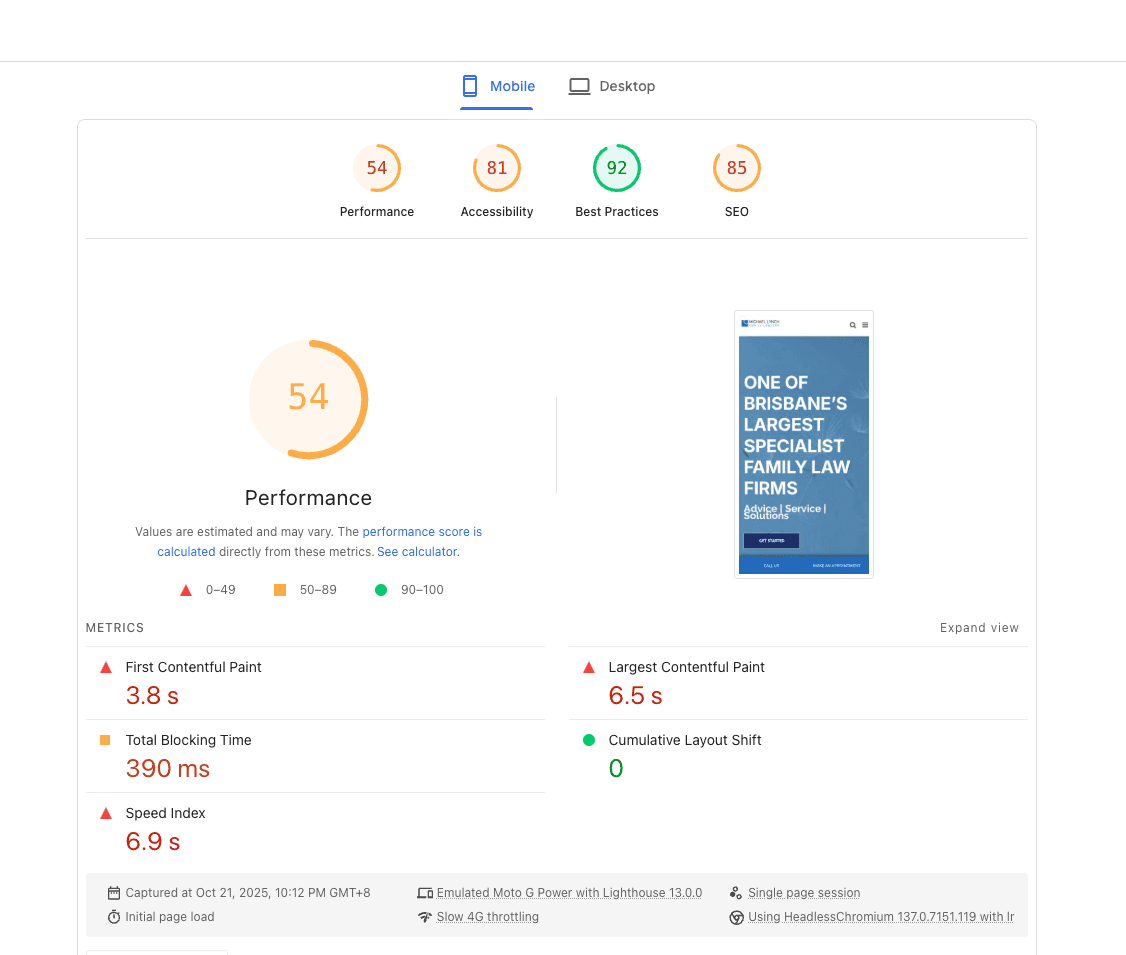
Page speed is a direct ranking factor for Google, and heavy animations significantly slow load times. The critical metric is Largest Contentful Paint, which measures how quickly your largest visible element loads. Since animations and videos typically represent the largest assets on a page, they can severely delay LCP. Research analyzing over 4 billion web visits found that only 34% of top websites pass Core Web Vitals on desktop, while 64.6% fail on mobile.
The Mobile-First Indexing Reality
Why Mobile Performance Determines Desktop Rankings
Google's mobile-first indexing means your mobile site performance directly determines your search rankings, regardless of how well your desktop version performs. With 55% of traffic coming from mobile devices globally and 97.4% of Australians using mobile for internet access, poor mobile animation performance doesn't just hurt user experience—it tanks your visibility.
In 2025, user experience sits at the core of successful SEO, with search engines prioritizing websites that are fast, mobile-friendly, and easy to navigate. When animations cause slow loading or stuttering, users abandon sites before they fully load, and Google interprets this as a negative quality signal. The algorithm doesn't see your creative vision—it only sees users hitting the back button.
What's the Real Cost of Animation on Mobile Conversions?
The 3-Second Window
The Bounce Rate Mathematics
The infamous three-second rule isn't marketing folklore—it's backed by extensive research and has profound implications for animated websites. A page load time on mobile of 10 seconds increases bounce rate by 123% compared to one-second loading speeds. But the damage begins much earlier than that.
Pages loading in one second convert three to five times better than those loading in five to ten seconds. For Australian e-commerce businesses, this translates directly to lost revenue. 73% of all e-commerce sales in 2025 happen on mobile devices, meaning your animated product pages aren't just annoying mobile shoppers—they're actively preventing purchases. Desktop conversion rates still outpace mobile at 4.3% versus 2.2%, and heavy animations widen this gap even further, making mobile conversions nearly impossible.
The Compound Effect Across Your Funnel
Calculating Your Actual Revenue Loss
Conversion loss isn't limited to a single page—it cascades through your entire customer journey. When animations cause performance issues, bounce rates spike by 70%. Consider the mathematics: if your monthly site traffic is 50,000 visitors, a 70% bounce rate spike means 35,000 additional people leaving immediately. If your typical conversion rate is 2%, that's 700 lost conversions monthly.
At an average transaction value of $200, you're losing $140,000 in monthly revenue, $1.68 million annually, purely from animation-induced performance problems. For SaaS businesses with higher customer lifetime values, these numbers become even more staggering. Mobile bounce rates run 12% higher than desktop, and animations amplify this existing disadvantage into a conversion catastrophe.
Which Industries Should Avoid Heavy Animation?
E-commerce and Price-Sensitive Markets
E-commerce businesses targeting price-sensitive customers face particular risks with heavily animated sites, as mobile shoppers with limited data plans abandon slow-loading pages. In Australia's competitive e-commerce landscape, where consumers routinely compare prices across multiple sites, every second of load time becomes a competitive disadvantage.
With 73% of e-commerce sales occurring on mobile and Australian consumers increasingly favoring mobile shopping, retailers cannot afford the conversion penalties that animation introduces. Fashion, electronics, and consumer goods retailers should prioritize lightning-fast product pages over animated flourishes that delay purchase decisions.
Professional Services and B2B
Financial services need to prioritize trust, clarity, and speed over visual flair. When someone searches for accounting services, legal advice, or business consulting, they're seeking information quickly—not an animated showcase. B2B websites receive 68% of traffic from desktops, but the remaining mobile traffic represents decision-makers researching on-the-go.
Healthcare and medical services users seek quick, clear information about serious health concerns, making heavy animation not just unnecessary but potentially harmful to conversions. Australian professional services firms should focus on fast-loading, content-rich pages that answer queries immediately rather than forcing users to wait through animated introductions.
When Does Animation Actually Help Conversions?
Strategic Animation vs. Fully Animated Sites
The Micro-Interaction Advantage
The distinction between strategic animation and fully animated experiences determines success or failure. The most successful approach uses strategic, purposeful animation rather than fully animated experiences, where animations enhance specific user journeys, communicate essential information, or reinforce brand identity without compromising accessibility, mobile performance, or SEO.
Micro-interactions—subtle hover effects, button state changes, loading indicators—provide visual feedback without performance penalties. When used strategically, animations provide visual feedback, direct attention to important elements, and create smoother transitions between states, improving overall usability. These lightweight animations typically add mere kilobytes to page weight while delivering measurable UX improvements. The key is restraint: animation should clarify, not complicate.
Industries Where Animation Adds Value
Creative and Portfolio-Driven Businesses
Creative agencies benefit from animation because it showcases creative capabilities directly through the website experience, demonstrating design expertise and innovative thinking. For these businesses, the website itself becomes a portfolio piece where performance trade-offs might justify stunning visual experiences—though even creative agencies should optimize animation delivery.
Animation studios, VFX artists, and motion designers use heavily animated portfolios to demonstrate technical skills and creative vision directly. Gaming companies benefit from immersive, interactive experiences with realistic motion that reflects gameplay quality. However, even in these animation-friendly industries, mobile devices account for 60-70% of web traffic in Australia, demanding careful performance optimization regardless of industry.
What Are the Alternatives to Fully Animated Websites?
Progressive Enhancement Strategies
Adaptive Animation Delivery
Progressive enhancement delivers the best of both worlds: beautiful animations for high-performance devices and fast, functional experiences for everyone else. This approach starts with a solid, fast-loading foundation and adds animation layers for devices that can handle them without degradation.
Modern web development allows you to detect device capabilities and connection speeds, serving lightweight experiences to mobile users while delivering richer animations to desktop visitors with fast connections. Technologies like Lottie animations are designed to load efficiently on mobile devices, providing smooth performance across different screen sizes when implemented properly. The goal isn't to eliminate animation but to ensure it never blocks, delays, or degrades the core user experience.
Performance-Optimized Animation Techniques
Technical Best Practices
Offering reduced motion options ensures animations serve clear functions beyond visual decoration, addressing both performance and accessibility concerns simultaneously. CSS animations generally outperform JavaScript-based alternatives, hardware-accelerated transforms (translate, scale, rotate, opacity) render smoothly even on modest devices, and lazy-loading techniques delay non-critical animations until users scroll to relevant sections.
With Google's increasing emphasis on user experience, site performance, and content quality, a holistic, multi-faceted approach is essential for ranking success in Australia. This means treating animation as enhancement rather than foundation. Prioritize content delivery first, then layer animations that genuinely improve comprehension or engagement. Mobile searches comprise a significant portion of all queries in Australia, making mobile-optimized animation delivery non-negotiable for Australian businesses.
How Can You Audit Your Website's Animation Performance?
Tools and Benchmarks
Start with Google's PageSpeed Insights and Core Web Vitals assessment tools, which provide specific scores for Largest Contentful Paint, Interaction to Next Paint, and Cumulative Layout Shift. Test your site on actual mobile devices—not just browser emulators—to experience the real-world impact of your animations.
Website conversion rates drop by 4.42% with each second of load time between zero and five seconds. Monitor your analytics for mobile vs. desktop bounce rate discrepancies, which often reveal animation-induced performance problems. If mobile bounce rates exceed desktop by more than 10-15%, animations likely contribute to the gap. Track page abandonment at specific scroll depths to identify where performance issues cause user exit.
Set performance budgets: establish maximum acceptable load times (ideally under 2.5 seconds for LCP) and file size limits (typically under 2MB total page weight) to prevent animation bloat during future updates.
Testing with Actual Australian Users
Synthetic testing tools provide baseline metrics, but real user monitoring reveals how actual Australian visitors experience your site across diverse devices, connection speeds, and geographic locations. Tools like Google Analytics 4 track Core Web Vitals from real users, showing performance variations across device types and connection speeds.
With Australian internet users spanning urban centers with high-speed broadband and regional areas with slower connections, performance testing must account for this diversity. A/B test animated versus static versions of key conversion pages, measuring not just aesthetic preference but actual conversion rate differences. Data trumps design opinions when revenue is at stake.
Making Data-Driven UX Design Decisions
The premium aesthetic that fully animated websites create comes with a measurable, often devastating cost. With 62% of global internet traffic coming from mobile devices and 97.4% of Australians using mobile for internet access, ignoring mobile animation performance isn't just a UX oversight—it's a fundamental business mistake.
The evidence is unambiguous: 53% of mobile visitors leave if pages take more than three seconds to load, animation performance problems can double mobile bounce rates, and conversions decrease by up to 20% for every second of load time. These aren't minor inconveniences—they represent millions in lost revenue for Australian businesses.
The solution isn't abandoning animation entirely but embracing strategic, performance-optimized motion design. Consider offering reduced motion options and ensure animations serve clear functions beyond visual decoration. Prioritize your mobile experience, optimize relentlessly, and let data—not designer preferences—guide your animation decisions. Your conversion rates will thank you.
Is Your Website Animation Killing Conversions?
Get Your Free UX Audit from DesignBff
Discover exactly how your website performs on mobile devices. Our comprehensive UX audit includes Core Web Vitals analysis across mobile and desktop, animation performance impact assessment, conversion bottleneck identification, mobile-specific user experience evaluation, and data-driven optimization recommendations.
Don't let beautiful design destroy your bottom line. Get Your Free UX Audit Today →
Frequently Asked Questions
Q1: How much do animations really slow down mobile websites?
Heavy animations can increase mobile page load times by 3-10 seconds depending on file sizes and complexity. Since 53% of mobile users abandon sites taking more than three seconds to load, this delay directly impacts bounce rates and conversions. Optimized animations using modern techniques like Lottie or CSS transforms typically add only 0.2-0.5 seconds to load times.
Q2: Do animations hurt SEO rankings?
Yes, indirectly. Page speed is a direct Google ranking factor, and heavy animations significantly slow load times. Animations impact Core Web Vitals—LCP, INP, and CLS—and poor scores can hurt search rankings. With Google using mobile-first indexing and 97.4% of Australians accessing the web via mobile, mobile animation performance directly affects visibility in Australian search results.
Q3: What types of businesses should avoid fully animated websites?
Healthcare, financial services, e-commerce with price-sensitive customers, legal and professional services, and senior-focused services should generally avoid fully animated websites. These industries require quick information access, trust-building, and fast conversions rather than extended animated experiences. Australian retailers should be particularly cautious given mobile shopping dominance.
Q4: Can I use animation without hurting mobile performance?
Absolutely. Focus on strategic, lightweight animations using CSS transforms, implement lazy loading for below-fold animations, offer reduced-motion preferences for accessibility, and test rigorously on actual mobile devices. Technologies like Lottie animations load efficiently on mobile devices when implemented properly. Keep total animation file sizes under 500KB and prioritize content delivery over decorative motion.
Q5: What's the ROI impact of fixing animation performance issues?
Pages loading in one second convert three to five times better than those loading in five to ten seconds. For a site with 50,000 monthly visitors and a 2% conversion rate, reducing load time from 5 to 2 seconds could increase conversions by 200-300%, generating an additional $80,000-$120,000 annually at $200 average transaction value. Performance optimization typically pays for itself within the first month.